 Surge Marketing Calendar
Plan a month of posts in one sitting.
A simple calendar for small business owners. Lay out your Instagram posts, Reels and emails, then pull it up on your phone when it's time to post.
Get the calendar for $50One-time payment, no subscription. 7-day money-back guarantee. Already have it? Sign in
November
Pick an idea, then pick a day.
See the whole month at a glance.
Every post, Reel and email sits on one calendar, so you can see what's coming and what's missing before the week gets busy.
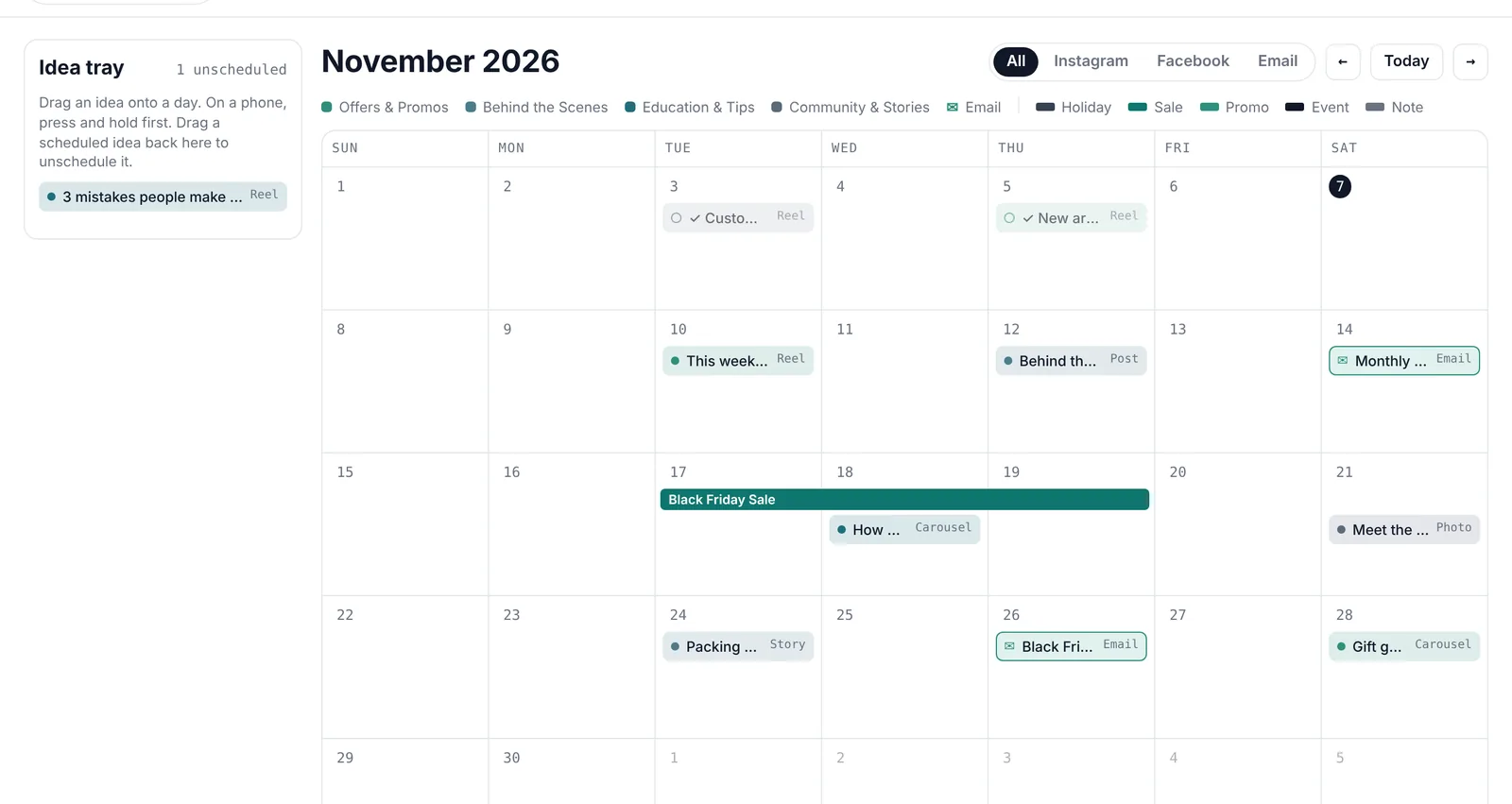
Drag ideas onto days
Ideas without a date wait in the idea tray until you're ready for them. Move them around as plans change.
Mark sales and holidays
Add date labels for sales, events and holidays, so your posts line up with what's happening in your business.
One channel at a time
Filter to just Instagram, Facebook or email when you want to focus.
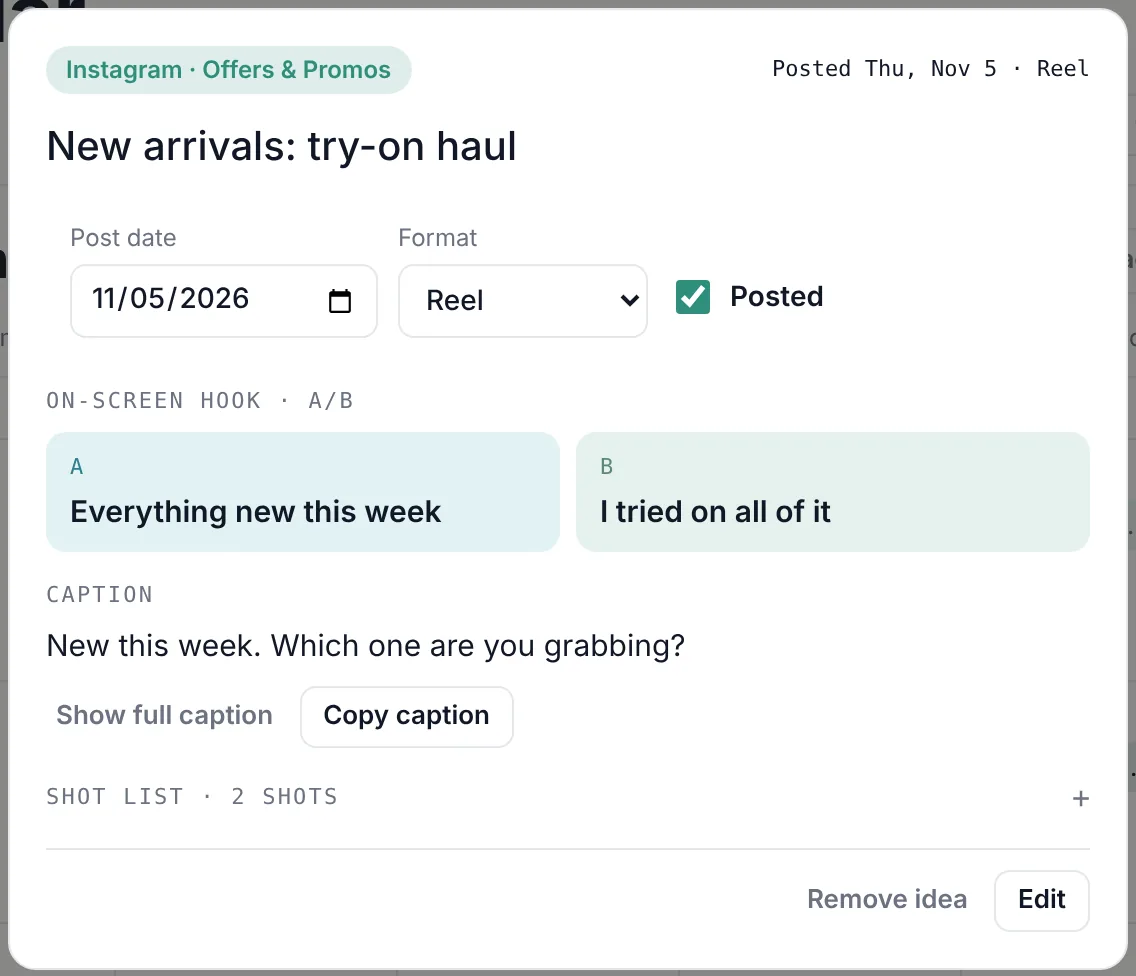
Everything you need to post is already written.
Each idea holds its caption, two hook options to test, and a shot list for Reels. When it's time to post, open it and copy the caption.
Hooks A and B
Write two opening lines and see which one your audience stops for.
Shot lists for Reels
Know exactly what to film before you pick up your phone.
Posted check-offs
Tick posts off as they go live and see your month's tally by content type.
Ask AI for help
Stuck on a caption? One tap sends the idea to your own Claude or ChatGPT, with your business details included.

Save the inspiration, and why you loved it.
See a Reel or post that stops your scroll? Paste the link onto an idea and jot down what caught your eye. When it's time to create, you'll remember exactly what you were going for.
Link to anything
Instagram, TikTok, Pinterest, a competitor's post, a blog. One tap opens it again.
Note the why
"The hook in the first second." "Those colors." "1 second per outfit." Future you will thank you.
Your AI gets it too
Ask AI includes your inspiration note, so the captions and shot lists it suggests match the vibe you saved.
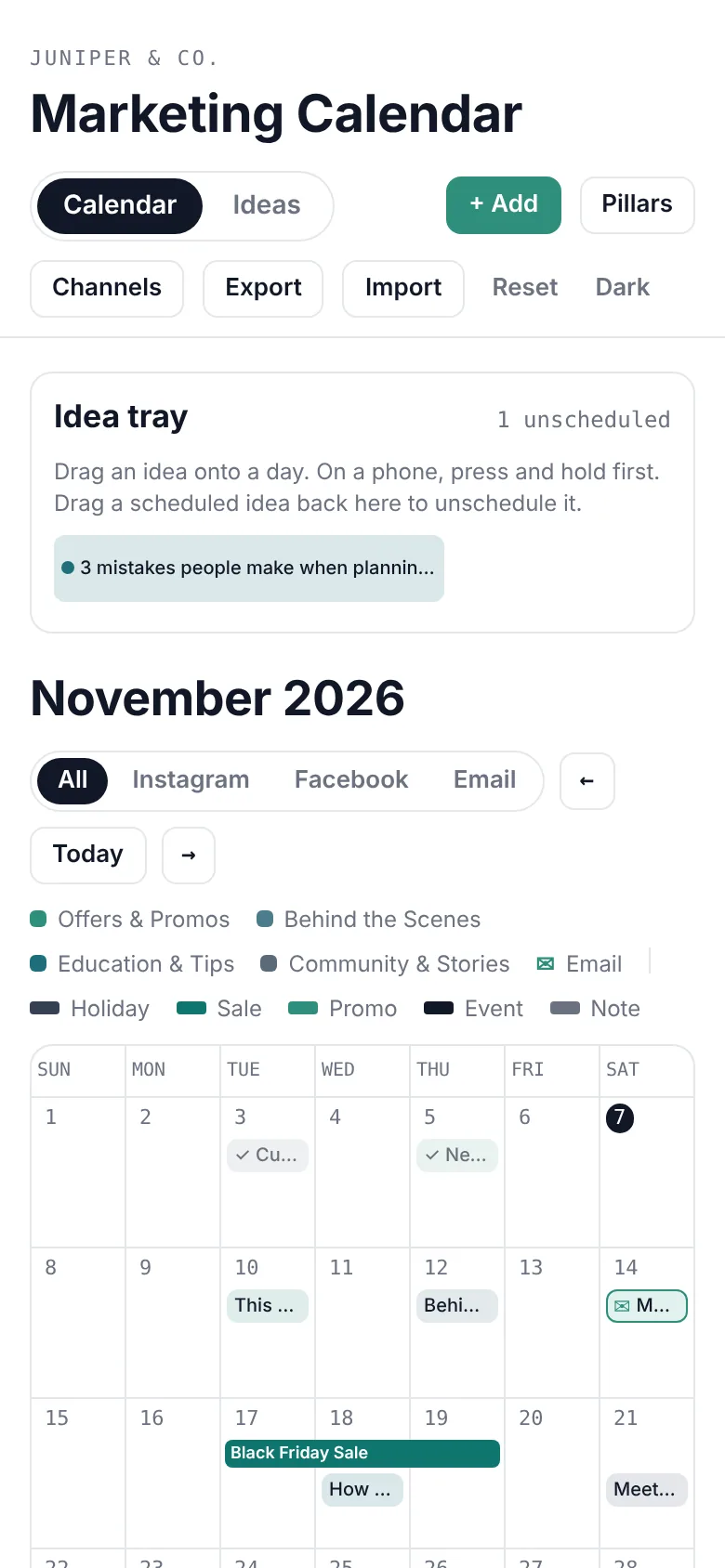
Plan on your laptop. Post from your phone.
Your calendar saves to your own account, so it's the same everywhere you sign in.
Syncs right awayChange something on your phone and it's already updated on your computer.
Works like an appAdd it to your home screen in a couple of taps. Nothing to download from an app store.
Keeps working with no signalIt catches up as soon as you're back online.
Make it fit your business.
Set it up once in a few minutes, and the whole calendar follows your choices.
Your content pillars
Rename the pillars and pick their colors to match the kinds of posts you make.
Only your channels
Choose from Instagram, Facebook, TikTok, email, LinkedIn and YouTube. The planner hides the rest.
Your plan, backed up
Download a backup of everything whenever you like, and restore it in one click.

Hi, I'm Seila.
I'm a marketing consultant in Utah County, and I've been on both sides of this. For three years I ran my own handmade hair bow shop, writing every post and email myself in between orders.
Since then I've managed marketing for a regenerative beef brand and run social media for a restaurant, including email, SMS and a customer loyalty program.
The thing that made the biggest difference every time wasn't a fancy tool. It was sitting down once a month and planning everything in one place. I built Surge Marketing Calendar so you can do the same, without a marketing team.
“Plan when you’re inspired, not when you’re desperate.”
Seila ChristensenFounder, Surge Marketing Assistance
Why not just use another app or template?
You've probably tried both. Here's how Surge compares to the monthly scheduler apps and the DIY templates most small businesses end up with.
| Feature | Surge Marketing Calendar | Scheduler appsmonthly subscriptions | DIY templatesNotion, Sheets, PDFs |
|---|---|---|---|
| What it costs | $50 once | About $150–300 a year, every year | $5–30 once |
| Ready to use, nothing to build | ✓Open it and start planning | ✓After connecting accounts | ✕You set it up and keep it running |
| Your own account, synced on phone and computer | ✓Works offline too | ✓ | ~Often clunky on a phone |
| Helps you decide what to post | ✓Idea tray, content pillars, sale and holiday dates | ~Built for scheduling, not planning | ~Depends on the template |
| Captions, hooks and Reel shot lists on every post | ✓ | ~Mostly captions | ~Depends on the template |
| Social posts and emails on one calendar | ✓ | ~Mostly social only | ~Depends on the template |
| AI help | ✓Uses your own ChatGPT or Claude, no extra fee | ~Often a paid upgrade | ✕ |
| Posts for you automatically | ~Plan here, then post free with Meta Business Suite | ✓ | ✕ |
| Money-back guarantee | ✓7 days, no hoops | ~Varies | ~Rarely |
App and template prices are typical ranges for popular small business options as of November 2026. Meta Business Suite is Meta's free tool for scheduling Facebook and Instagram posts.
$50, once.
No monthly fee. Buy it, sign in, and start planning tonight.
7-day money-back guarantee. Try it for a week. If it doesn't work for your business, email me and I'll refund you in full, no hard feelings. I've run a small business too, and I'd rather you spend that money on something that works for you.
- The full calendar on your phone and computer
- Your own private account
- Captions, hooks and shot lists for every idea
- Ask AI buttons that work with your Claude or ChatGPT
- Sample ideas to get you started
After checkout you'll get an email with your sign-in link. Full refund within 7 days if it's not for you.
Questions
Is this a subscription?
No. You pay $50 once and keep using it.
What if it's not for me?
You have 7 days to try it. If it doesn't fit how you work, email surgeassisting@gmail.com within 7 days of buying and you'll get a full refund. No forms to fill out and no hoops.
Does it post to Instagram for me?
No. It's where you plan your posts and keep everything you need to publish them. When it's time to post, open the idea, copy the caption and post it yourself.
Does it use AI?
Yes, with the AI you already use. Each idea has Ask AI buttons that open your own Claude or ChatGPT with a ready-made prompt for captions, hooks, Reel shot lists or a week of post ideas. A free account with either works. There's no extra AI fee from us.
What do I need to use it?
Just a web browser on your phone or computer: iPhone, Android, Mac or Windows. On your phone you can add it to your home screen so it opens like an app.
How do I get in after I buy?
You'll get an email with your sign-in link. Create your account with the same email you used at checkout, and your calendar is ready.
Is my plan private?
Yes. Your calendar is saved to your own account and only you can see it.
I have another question.
Email surgeassisting@gmail.com and you'll get a reply from a real person.